AI, explained in plain English.

There’s a lot of noise about AI. For most companies, the useful part is practical, and it comes down to three things. Here’s what each one means in plain English.

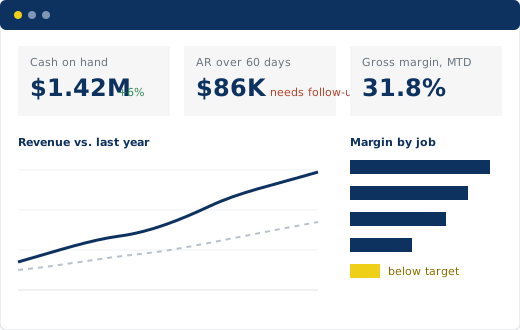
Financials, sales, operations, inventory and job cost in one place, refreshed automatically from your ERP. No more waiting for month-end or rebuilding the same spreadsheet.

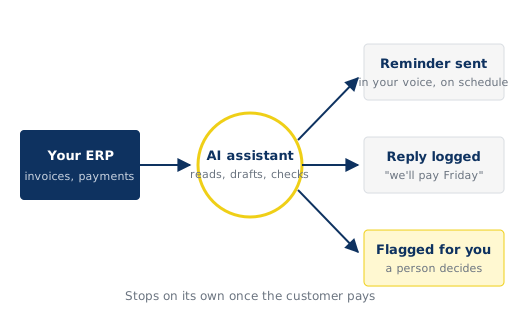
Routine follow-up and data entry handled on schedule: past-due reminders, quote follow-ups, vendor invoices checked against your system, with anything unusual flagged for a person.

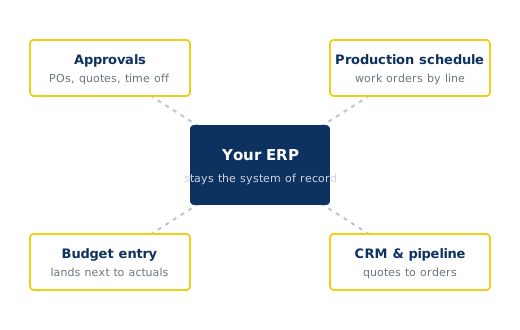
When your ERP almost does what you need, we build the missing piece around it: approvals, production schedules, budget entry, CRM and pipeline, all on the data you already have.
Live dashboards
A dashboard connects to your ERP and refreshes on its own. Everyone sees the same numbers, and you can click from a total down to the transactions behind it.
AI automations
AI is good at reading, drafting and checking. We put it to work on the repetitive tasks around your ERP, and anything that needs judgment goes to a person.
Extending your ERP
Replacing an ERP is a big project. Filling its gaps doesn’t have to be. We build the missing piece around your system and keep your ERP as the system of record.
Do we need to replace our ERP?
No. We work with QuickBooks, Sage, Business Central, NetSuite and other ERPs. Your ERP keeps doing what it does well; we build around it.
Where does it run, and who can see our data?
We build it in your own cloud account, signed in with your company logins, so your IT team can see everything. If a project uses AI, we can run it under your own account and settings.
Will AI make decisions on its own?
Only the routine ones you approve, like sending a scheduled reminder. Anything unusual is flagged for a person to review.
How big a project is this?
Most clients start with one dashboard or one automation. Each piece is scoped and quoted before work starts, so there are no surprises.
Do we need technical staff to keep it running?
No. It refreshes on its own. We hand it over with clear notes on the few things someone should keep an eye on.
Tell us which of those sounded familiar. We’ll show you what a fix could look like for your business.

Peak Business Navigation is based in Madison, WI, serving clients in Wisconsin, Michigan, Minnesota, Iowa, Illinois and Indiana.